
AI Technologies
10 Best AI Tools for Data Analysis in 2026: Features, Uses, and Benefits


Data plays an important role in business decisions, digital marketing, customer research, and website growth. However, working with large datasets can take hours when you need to organize information, calculate results, identify patterns, and prepare reports. This is where AI tools for data analysis can make a difference.
These tools help users understand data, create visualizations, summarize reports, and discover useful insights. Some are designed for spreadsheets and everyday questions, while others support business dashboards, predictive analytics, and advanced data science projects.
I use AI frequently for digital marketing, SEO keyword planning, and content optimization. For example, AI can help organize large keyword datasets from tools such as Semrush into topic clusters and search intent groups. This can reduce several hours of manual sorting to a few minutes of initial processing. I also use Google Search Console to analyze website search performance.
However, AI does not always produce accurate results. I have encountered situations where it generates incorrect formulas or miscalculates numbers. That is why I believe human review is essential before using AI-generated results to make important decisions.
In this guide, we will explore 10 AI tools for data analysis, explain their main features, and discuss how to choose the right option for your needs.
What Are AI Tools for Data Analysis?
AI tools for data analysis are software applications that use artificial intelligence to help people collect, organize, examine, and understand information. They can simplify tasks that would otherwise require manual calculations, complex formulas, or programming skills.
For example, imagine that you have a spreadsheet containing thousands of SEO keywords. Each keyword has information such as search volume, keyword difficulty, and search intent. Instead of reviewing every row manually, you can use an AI assistant to organize related keywords into groups and suggest possible content topics.
Other tools can connect to business databases, create dashboards, identify sales changes, and support predictive modeling. Some allow users to ask questions in plain English, while others require more technical knowledge.
The best choice depends on your data and what you want to achieve. A blogger may need help organizing keywords, while a business analyst may need interactive dashboards or automated reports. Large companies may require tools that can process substantial datasets while maintaining strict security controls.

How AI Is Changing Data Analysis
Traditional data analysis often involves cleaning datasets, writing formulas, preparing charts, and manually reviewing results. AI can assist with these steps by suggesting calculations, explaining patterns, and generating initial reports.
For example, a business owner could ask why sales decreased during a particular month. An AI-powered application might compare monthly figures, identify products with declining sales, and highlight areas that need further investigation.
AI tools for data analysis can also make technical tasks more accessible. A user who does not know SQL may be able to describe a question in plain language and receive a suggested database query. An experienced analyst can then review the query, test it, and verify the output.
Automation is another advantage. Repeated tasks such as categorizing information, preparing summaries, and checking data quality can sometimes be automated. However, the level of automation varies between tools, and users should not assume every result is correct without checking it.
10 Best AI Tools for Data Analysis
1. ChatGPT
ChatGPT is a flexible AI assistant that can help users explore data, understand tables, generate formulas, summarize information, and work with supported files. Its available data-analysis features depend on the current plan, model, and interface.
Users can ask questions about a dataset instead of manually examining every row. For example, a marketing professional might upload a spreadsheet and request a summary of the highest-performing keywords, common topics, or possible search intent groups.
ChatGPT can also help explain spreadsheet formulas, suggest ways to clean data, and turn analytical findings into readable reports. This makes it useful for people who want assistance without writing code for every task.
In my own workflow, I use AI to help process and organize keyword data for SEO and content planning. A large Semrush export can contain many related search terms, and AI can help group them into topic clusters. I still need to review those groups because similar keywords do not always have the same search intent.
Among AI tools for data analysis, ChatGPT is a practical option for flexible tasks involving spreadsheets, text, calculations, and explanations. However, users should verify important numbers against the original dataset before relying on the results.
Best for: General data exploration, SEO keyword clustering, spreadsheet assistance, and plain-language explanations.
2. Microsoft Power BI
Microsoft Power BI is a business intelligence platform used to connect data sources, create interactive dashboards, and share reports. Its AI-assisted capabilities can help users explore business information and understand performance trends.
A company might use Power BI to combine sales figures, inventory records, and customer information in one reporting environment. Managers can then monitor revenue, compare product performance, and examine results across different locations.
Power BI is particularly useful when a business needs reports that can be updated regularly. Instead of preparing the same spreadsheet manually every week, a team can build a dashboard connected to its data sources.
When comparing AI tools for data analysis, consider Power BI if your work involves business reporting and performance monitoring. It can also be useful for organizations that already use Microsoft products.
However, building a reliable dashboard requires accurate data connections and a well-designed data model. Users must check formulas, relationships, and measures to ensure that the report answers the right questions.
Best for: Business dashboards, recurring reports, and performance tracking.
3. Tableau
Tableau is a data visualization and business intelligence platform that helps users explore information through charts, graphs, and interactive dashboards. Its analytical features can help people identify patterns and communicate findings more clearly.
For example, a retail business could use Tableau to compare sales across regions, investigate seasonal trends, and identify product categories that perform well. Users can explore different parts of the data instead of relying on a single summary.
Visual reporting is valuable because a large table of numbers can be difficult to understand. A well-designed dashboard makes comparisons easier and helps decision-makers focus on important changes.
Among AI tools for data analysis, Tableau is worth considering when visualization is a major part of your work. It can support teams that need to explain complex information to managers, clients, or other departments.
However, attractive charts do not automatically guarantee accurate conclusions. Users should choose suitable visualizations, check the underlying figures, and avoid suggesting relationships that the data does not support.
Best for: Interactive dashboards, visual exploration, and business reporting.

4. Google Gemini
Google Gemini is an AI assistant that can help users summarize information, understand content, and complete supported productivity tasks. Depending on the version and available integrations, it can also assist with spreadsheet-related work and information analysis.
People who use Google Workspace may find Gemini convenient because it can fit into an existing workflow. For example, an eligible user might request help understanding a table, creating a formula, or summarizing information from supported documents.
I have used Gemini, but I do not claim that every example described here comes from my personal testing. Its suitability depends on the features available to the user and the type of work they need to complete.
AI tools for data analysis are often more useful when they fit naturally into your daily workflow. If your files and collaboration already rely on Google services, Gemini may be worth evaluating before adopting a separate platform.
As with other AI assistants, verify calculations and formula suggestions. Also, check which files and integrations are supported in your particular account.
Best for: Google-centered workflows, information summaries, and supported productivity tasks.
5. Julius AI
Julius AI is designed to help users analyze datasets through a conversational interface. Depending on its current features and supported file formats, users can ask questions about data, explore patterns, and create visual summaries.
For example, someone could provide a spreadsheet containing monthly expenses and ask which categories account for the largest share of spending. The tool may help summarize the information and present the findings in a chart.
Julius AI may appeal to users who want a dedicated data-analysis experience instead of a general-purpose assistant. Its conversational approach can make common analytical tasks easier to start, particularly for people who are not comfortable writing code.
However, the output still needs to be checked. If the spreadsheet contains missing values, duplicate records, or unclear column names, the analysis may not reflect the situation accurately.
Before choosing this option, review its current pricing, supported data formats, file-size limits, and privacy policies.
Best for: Conversational data exploration, spreadsheet analysis, and visual summaries.
6. ThoughtSpot
ThoughtSpot is an analytics platform that helps users explore business data through search-based and AI-assisted experiences. It is designed to make information more accessible to people who need answers without building every report themselves.
For example, a sales manager may want to compare revenue across regions or identify which product categories are performing best. Search-driven analytics can help users investigate questions using connected business data.
This approach can be helpful when different teams need to explore information independently. Instead of requesting a new report for every question, employees may be able to investigate available data directly.
Among AI tools for data analysis, ThoughtSpot is worth considering for organizations that prioritize self-service analytics. However, the results depend on the quality of the underlying data, the setup of the analytics environment, and the permissions assigned to users.
Businesses should review governance and access controls before connecting sensitive information.
Best for: Search-driven analytics and self-service business reporting.
7. Zerve
Zerve is a data science environment intended to support analytical work involving datasets, code, and collaborative workflows. It is more relevant to technical users than tools focused mainly on simple spreadsheet questions.
Data science projects often involve several connected steps, including preparing data, running experiments, testing code, and documenting results. A dedicated environment can help organize this work and support collaboration between team members.
AI tools for data analysis aimed at technical users can offer greater flexibility, but they may require a stronger understanding of programming and analytical methods. Users need to recognize errors, evaluate model outputs, and understand the limitations of their approach.
Before selecting Zerve, check its current features, integrations, pricing, and collaboration options. Testing a small project can help you decide whether it fits your workflow.

Best for: Technical data science work and collaborative analytical projects.
8. Databricks
Databricks is a data and AI platform used for data engineering, analytics, and machine learning. It supports organizations that need to work with large datasets and manage complex data workflows.
A large company might use Databricks to process customer activity, combine information from different systems, or prepare data for predictive models. These projects often require structured pipelines and coordination between data engineers, analysts, and other specialists.
Compared with simpler AI tools for data analysis, Databricks is generally better suited to technical teams and enterprise environments. It can support complex projects, but the setup may be more demanding than a beginner needs.
Organizations should consider computing costs, security, data governance, and staff expertise before choosing a platform of this scale. A small business that only needs occasional spreadsheet summaries may benefit more from a simpler application.
Best for: Large datasets, data engineering, and machine learning workflows.
9. DataRobot
DataRobot focuses on enterprise AI and machine learning. Its capabilities support organizations that want to build, evaluate, and manage predictive models using historical data.
For example, a company might analyze previous customer activity to estimate which customers are more likely to stop using a service. A predictive model can help identify patterns that deserve further investigation.
Predictive analytics differs from simple reporting. A report explains what has already happened, while a predictive model estimates what might happen next. These estimates are not guarantees, and their usefulness depends on the quality of the data and the model.
AI tools for data analysis that include machine learning features can support more advanced business decisions. However, organizations must evaluate model performance, monitor changes, and consider bias or missing information.
DataRobot may be worth exploring for companies that need managed machine learning capabilities rather than occasional data summaries.
Best for: Predictive analytics, machine learning, and enterprise AI projects.
10. Polymer
Polymer is a data-focused platform designed to help users explore and present information through a visual interface. Its current capabilities and availability should be checked before choosing it for a specific workflow.
For example, a small business might have a spreadsheet containing product sales, categories, and customer activity. A visual analytics application can help users explore the information and make patterns easier to communicate.
Polymer may appeal to people who prefer working through a visual interface instead of writing code. It can be useful to compare this approach with spreadsheet tools and other analytics platforms before making a decision.
As with other AI tools for data analysis, the main question is whether the application handles your dataset accurately and provides features you genuinely need. Try a small dataset and compare the results with the original information before using the output in a report.
Best for: Visual data exploration and accessible presentation of structured information.
Benefits of Using AI for Data Analysis
One major benefit of AI is that it can reduce time spent on repetitive tasks. Summarizing tables, organizing information, suggesting formulas, and preparing initial reports can take less effort with the right tool.
AI can also make data more accessible. Users may be able to ask questions in plain language rather than learning every technical command before beginning an analysis. This can help beginners understand their information and identify questions worth investigating.
For SEO professionals, AI can assist with keyword clustering and content planning. In my workflow, AI can organize large keyword datasets into topic groups and likely search intent categories. This can reduce several hours of manual sorting to a few minutes of initial processing, although the results still require review.
Other benefits include faster report preparation, support for data visualization, and help identifying unusual patterns. However, these benefits depend on the task, the tool, and the quality of the source data.

Limitations and Challenges
AI-generated results are not always accurate. A tool may misinterpret a column, suggest an incorrect formula, miscalculate a total, or produce a conclusion that the data does not support.
I have encountered the risk of incorrect formulas and calculations, which is why I recommend checking important results independently. For website performance, Google Search Console provides useful source data, including clicks, impressions, click-through rate, and average position. Comparing AI-generated conclusions with the original figures helps reduce the risk of relying on incorrect information.
Privacy is another important consideration. Business datasets may contain customer details, financial information, or confidential records. Review a provider’s data policies, account settings, and access controls before uploading sensitive information.
Data quality also matters. Duplicate rows, missing values, inconsistent labels, and outdated records can affect the results. AI may help identify some problems, but users should not assume that every issue will be detected automatically.
Finally, consider cost and complexity. Some tools are suitable for simple tasks, while others require paid subscriptions, technical setup, or specialist knowledge.

How to Choose the Right Tools for Data Analysis
Start by identifying your main goal. You might need to organize SEO keywords, summarize a spreadsheet, create business dashboards, or build predictive models. Defining the task makes it easier to compare suitable options.
Next, check data compatibility. Make sure the tool supports your file formats, databases, and existing applications. A solution that fits your current workflow may be easier to use than one that requires moving all your information into another system.
Consider your technical skills as well. Beginners may prefer conversational interfaces, while experienced analysts may need SQL, code execution, advanced visualizations, or machine learning features.
Security should also influence your choice. Review data handling policies, permissions, and organizational requirements before connecting business information.
Finally, test the tool with a small dataset you already understand. Check the calculations, review the conclusions, and compare the output with a trusted source. The most suitable AI tools for data analysis should save time while producing results that you can verify and explain.

Frequently Asked Questions
1. What are the best AI tools for data analysis?
The best option depends on your needs. ChatGPT and Gemini can help with general questions and supported file tasks. Power BI and Tableau are useful for business intelligence and visualization, while Databricks and DataRobot are more relevant to technical and enterprise projects. Compare features, accuracy, security, and cost before choosing.
2. Can AI analyze Excel and CSV files?
Yes, many AI-enabled applications support Excel or CSV analysis. Depending on the tool, you may be able to summarize columns, identify patterns, generate charts, or ask questions about your data. Always verify important calculations and check that the file was interpreted correctly.
3. Are AI tools for data analysis suitable for beginners?
Yes. Some tools allow beginners to ask questions in plain language and explore information through visual interfaces. However, beginners should still learn what their data represents and verify the results before relying on them for important decisions.
Final Thoughts
AI can make data analysis more accessible by helping users organize information, explore patterns, prepare reports, and understand results. The right choice depends on your data, goals, budget, and technical skills.
For SEO and digital marketing, AI can help organize keyword lists and prepare an initial content strategy. For business reporting, Power BI and Tableau offer dashboard-focused workflows. Technical teams may need platforms built for large datasets, data engineering, or machine learning.
My advice is to start with one clear task and a small dataset. Test the tool, verify its calculations, and compare its conclusions with reliable source information. AI can reduce manual work, but human judgment remains essential for accurate and useful analysis.


AI forecasting helps businesses predict what will happen next, such as sales, demand, or staffing needs. A wrong guess costs real money, because too much stock ties up cash and too little means lost sales. One finance software company says global retailers lose over $1 trillion a year to inventory mistakes, which shows why better AI forecasting matters.
I want to be clear about where this guide comes from. I haven’t run AI forecasting projects for clients, and I haven’t used these tools in a company setting. My knowledge comes from reading and comparing eight published guides on the topic, from IBM, HubSpot, Domo, Cube, Zoho, Abacum, Corpim, and a general business blog. I looked for the points they agreed on and flagged claims that looked like sales pitches. I also share my own view as a learner: beginners should start simple.
In this guide, you will learn how AI forecasting works, which models and tools are worth trying first, how to prepare your data, and how to check whether your predictions can be trusted.
What Is AI Forecasting and Why Does It Matter?
AI forecasting uses artificial intelligence and machine learning to study past data and predict future results. Those results might be next month’s sales, the number of calls a support team will get, or how much electricity a city will need during a heat wave. The system looks for patterns in history, makes a prediction, and then updates itself when new data arrives.
This ability to keep learning is the main reason AI forecasting has grown so popular. Markets move faster than they used to, and companies track far more information than they did even a few years ago. Weather, prices, promotions, web traffic, and social media can all change demand. A person with a spreadsheet cannot watch all of those signals at once, but a well-built model can.
Good AI forecasting also leads to better decisions. IBM’s guide explains that even small forecasting errors can affect costs, service levels, and customer happiness. A store that predicts a holiday rush can send extra drinks to the right locations. A hospital that predicts flu season can plan nurse schedules and beds early. A bank can predict which loans might go unpaid and adjust its reserves.
One point shows up in nearly every guide I read: AI forecasting works best when people stay involved. A model can find patterns in millions of records, but it cannot know that your biggest customer is about to switch suppliers. It also cannot know that a new law will change your market next month. People bring that context, so you should treat each forecast as a strong first draft that someone with business knowledge reviews.

How AI Forecasting Differs From Traditional Methods
Traditional forecasting uses tools like moving averages, exponential smoothing, regression, and expert judgment. Many teams run these inside Excel. They work well when patterns are steady, and they are easy to explain. That second point matters when a boss or an auditor asks how you got your number.
AI forecasting handles messier situations. It can find nonlinear patterns, such as a price cut that boosts sales in summer but does nothing in winter. It can also use unstructured data like text and customer behavior signals, and it can refresh automatically instead of waiting for an analyst to rebuild the model every quarter. Because the process is automated, AI forecasting can scale to thousands of products or locations.
Several of the guides claim that traditional methods reach about 60 to 75 percent accuracy while AI forecasting reaches 80 to 95 percent. I would treat those numbers carefully. They appear in more than one article without a clear source, and the better results only hold when your data is clean and plentiful.
Traditional methods still win in some cases. If your demand is steady, you have limited history, or someone needs to audit every calculation, a simple statistical model may be your best choice. Many teams blend both approaches, using simple models for stability and machine learning where the patterns get complicated.
How AI Forecasting Works Step by Step
Most AI forecasting follows a repeating cycle, and it starts with a clear goal. You decide what you want to predict, such as revenue, units sold, or call volume. You also choose how far ahead to look and how detailed the forecast should be. Most importantly, you connect the forecast to a real decision, like how much inventory to order or how many employees to schedule. A forecast with no decision attached rarely changes anything.
Next, you gather data from the places where your business already stores it. Common sources include sales records, CRM and ERP systems, web analytics, and sensors. Outside signals can help too, such as holidays, weather, economic reports, and competitor prices. After that, the data gets cleaned. Duplicates are removed, gaps are filled, and formats are standardized so that products, regions, and dates line up correctly.
Then comes model training. The team feeds part of the history into one or more models so they can learn patterns, such as weekly cycles or holiday spikes. The rest of the history is held back for testing. This is called backtesting, and it checks how the model would have done on periods it has not seen. If a model does great on training data but poorly on test data, it has probably memorized noise instead of learning real patterns.
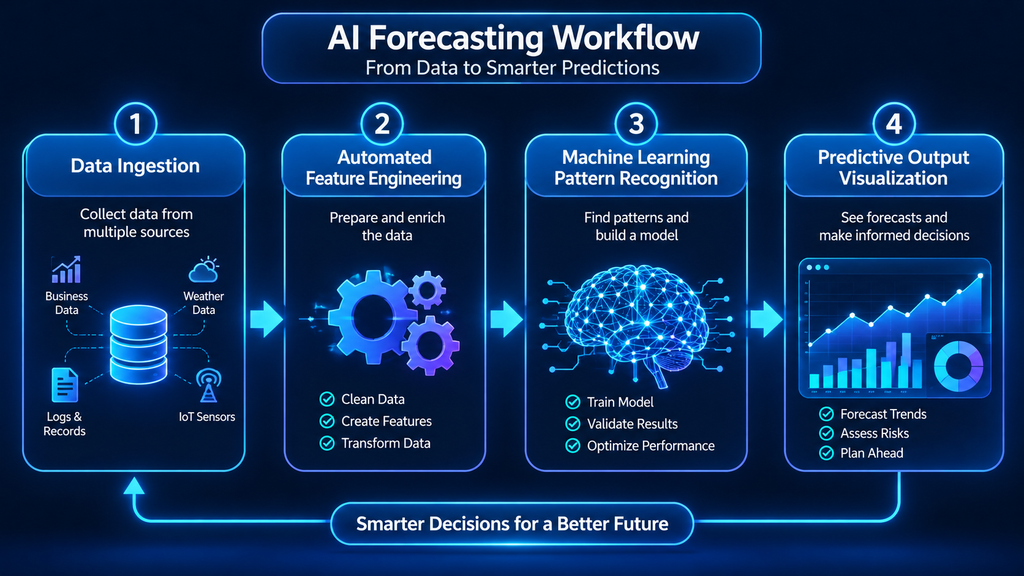
The best model is then placed into a dashboard or planning tool, where it creates new forecasts on a schedule. The work does not stop there, though. Markets and customer habits change, so teams track accuracy over time and retrain the model when it slips. This slow decline is called model drift, and watching for it separates AI forecasting systems that last from those that get abandoned.
Best AI Forecasting Models and Tools to Start With
No single model is best for every job. Domo’s guide recommends testing several approaches on your own data and choosing the winner by measured accuracy instead of reputation. That advice makes sense to me, and it fits well with a simple starting point for beginners.
Why I Recommend Starting With Simple Models
In my view, beginners should start with simple forecasting models such as Prophet and traditional time-series methods. They are easier to understand, they need less setup, and they can give useful results when you have enough history. You also learn more from them, because you can see why a forecast moved up or down.
ARIMA is a classic time-series model. It uses past values and moving averages, trains quickly on limited data, and is easy to interpret. It does assume the data is fairly stable, so it struggles when conditions change suddenly. Prophet, built by Meta, handles holidays, missing values, and outliers well. It splits a forecast into trend, seasonality, and holiday effects, which makes the results simple to explain. Exponential smoothing methods work in a similar way and suit sales and demand data with clear seasonal patterns.
More advanced options exist. Gradient boosting methods like XGBoost work well when many outside factors affect results, such as price, promotions, and weather. Random forests handle noisy data, and LSTM networks can learn from long sequences, such as months of sensor readings. These models are powerful, but several guides warn that deep learning often needs thousands of observations before it beats simpler methods. Starting with a complex model on a small dataset is a common mistake.
So my recommendation is to begin with a simple model and test it against real results. Add complexity only when you can prove the extra accuracy is worth it and your team can still explain the numbers. This keeps AI forecasting practical instead of confusing.
Popular AI Forecasting Tools to Explore
The right tool depends on your skills and your goals. Finance teams that live in spreadsheets often look at Cube, Datarails, or Abacum, which add forecasting and reporting to Excel or Google Sheets workflows. Larger companies with complex planning needs consider Anaplan, Workday Adaptive Planning, or Pigment, which cover finance, workforce, and operations.
If you want to build your own models, Prophet is a free, open-source option, and TensorFlow supports deep learning. H2O AI Cloud and DataRobot offer automated machine learning, which picks and trains models with less manual work. Akkio is a no-code platform for people without a technical background. Zoho Analytics supports several standard models and can choose one automatically based on your data. It also offers what-if analysis, where you move a slider to see how a budget change might affect sales.

I have not tested these tools myself, so I cannot rank them from experience. I can pass along one caution from my research: most articles about tools are written by software companies, and each one ranks its own product first. Amazon Forecast also no longer accepts new customers, so skip it unless you already use it. Whichever tool you consider, ask for a trial and test it on a small slice of your own data first.
Preparing Your Data and Measuring Forecast Accuracy
Data quality sets the ceiling for AI forecasting quality. A smart model fed incomplete or messy records will still give weak predictions. In my opinion, the most common beginner mistake is trusting historical data without checking it. Missing values, seasonal changes, and unusual demand patterns can all distort results. My advice is to clean and understand your data first, start with a simple model, and test its predictions against actual results before making important decisions.
Most guides suggest at least two to three years of history so a model can learn yearly seasonality. Predicting rare events or long-term trends may need five years or more. Older data may matter less if your business changed a lot, for example after a new pricing plan. Detail level matters too. Daily data supports daily forecasts, while weekly data limits you to weekly ones.
Common Data Traps to Avoid
Domo’s guide points out several traps that catch teams again and again:
- Stockout censoring: If a product sold out, past sales understate real demand, so the model will under-forecast unless you flag those periods.
- Data leakage: Training on information you will not have at forecast time, such as final revised sales numbers, makes test results look great and real results look poor.
- Promotional effects: You need to separate normal baseline demand from the extra lift a promotion creates, or you will overpredict future promotions.
- Cold starts: New products have no history, so you can borrow the history of similar products.
Missing values also need a clear plan. Filling gaps with simple averages can add bias, so write down how you handled them. One-time events, like a viral social media post or a data entry error, should be flagged so the model does not treat them as repeatable patterns.
Once your data is ready, you need a way to judge your results. Mean absolute error (MAE) is the average gap between forecast and actual. If it is 50 units, you are off by about 50 units on average. Mean absolute percentage error (MAPE) shows the gap as a percentage, which makes different products easier to compare, but it breaks down when actual values are zero. Weighted absolute percentage error (WAPE) fixes that by dividing total error by total actual demand, so big sellers count more. Root mean square error (RMSE) squares each error first, so large misses hurt more.
A small example shows how they differ. Say actual demand was 100, 150, and 200 units, and the forecasts were 110, 140, and 210. The MAE is 10 units. The MAPE is about 6.1 percent. The WAPE is about 6.7 percent, because the total error of 30 units is divided by 450 units of demand.
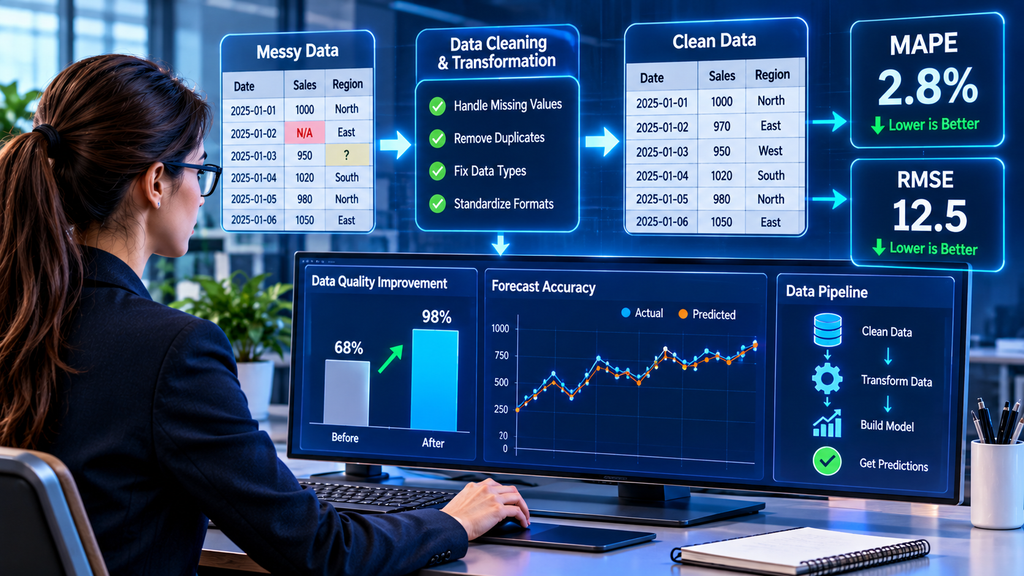
How you test matters as much as which metric you pick. Never split time series data randomly, because the model then sees the future during training. Instead, use rolling backtesting. Train on data up to a cutoff date, forecast the next period, move the cutoff forward, and repeat. This gives a more honest picture of how your AI forecasting would have performed in real life. You should also track bias, which is the average signed error. A model with low error but steady bias will slowly pile up too much or too little inventory.
Benefits and Limits of AI Forecasting
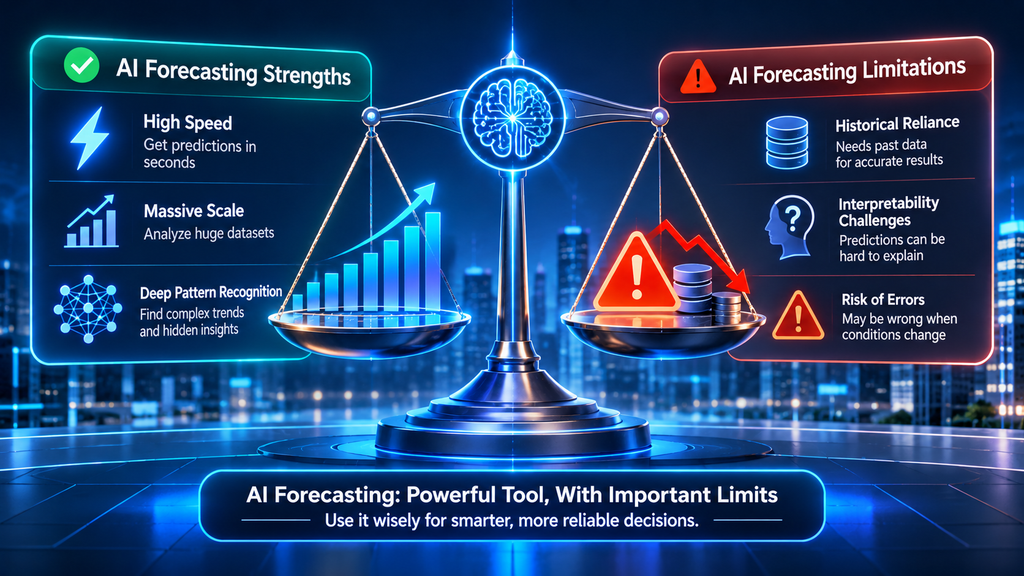
The most direct benefit of AI forecasting is better accuracy, especially when conditions change quickly. One general business guide cites a McKinsey finding that near real-time data updates can cut forecast errors by up to 50 percent. Abacum’s CEO describes error reductions of 20 to 50 percent but gives few details about the source. I would treat these numbers as possibilities, not promises.
Speed is another gain. Automated data refreshes and backtesting shorten planning cycles, so teams can react in days instead of waiting for the next quarterly update. Abacum’s article reports that Groupe Casino saw a 30 percent improvement in forecast accuracy using Google’s Vertex AI, along with four times faster model training.
AI forecasting can also save money. HubSpot cites McKinsey figures saying that in telecom, energy, and healthcare, AI forecasting can automate up to half of workforce-management tasks and cut costs by 10 to 15 percent. Those savings come from avoiding overstock, understaffing, and last-minute rush orders. Scale helps as well, since one model can refresh thousands of forecasts at once. Many tools also show a range of outcomes, so leaders can see best and worst cases instead of a single number.
Where AI Forecasting Falls Short
Poor data is the biggest threat. AI treats whatever you give it as truth, so duplicates, gaps, and biased history flow straight into the forecast. A model trained mostly on sales from one region may underpredict demand in a market the company never served well, because the data reflects past business choices instead of true demand.
Sudden change is another limit. AI forecasting learns from the past, so recessions, pandemics, and supply shocks can break a model trained before the event. Better math does not fix this problem. You need to watch for signs that old patterns no longer hold, keep backup plans ready, and add scenario planning on top of the statistics.
Resources also matter. Good AI forecasting needs skilled people, data pipelines, and ongoing monitoring. No-code tools lower the barrier, but connecting them to your current systems still takes effort. Complex models can be hard to explain to a skeptical manager, and some tools pull in sensitive customer or financial data, so privacy deserves attention. Finally, some teams treat AI forecasting as a “set it and forget it” tool. Predictions with no human review often miss business context, so I suggest naming one person who owns each forecast.
If you are just starting out, here is a practical path. Pick one small forecast, such as weekly sales for a single product. Clean the data, run a simple model, and compare its predictions with what actually happened. Repeat for a few weeks before trusting it with bigger decisions. This approach costs little and teaches you a lot about your data.

Frequently Asked Questions About AI Forecasting
What is the best way for a beginner to start with AI forecasting?
Start small. Choose one thing to predict, such as weekly sales, and gather at least two to three years of clean history if you can. Try a simple model like Prophet or a traditional time-series method first. Compare its predictions with real results before using it for important decisions, and add more advanced models only after you understand how the simple one behaves.
How accurate is AI forecasting?
Accuracy depends on your data, your model, and how stable your business is. Some sources claim error reductions of 20 to 50 percent, and others claim accuracy of 80 to 95 percent, but those figures vary widely and often lack clear sources. The best way to learn what AI forecasting can do for you is to run a small test on your own data and measure the results with a metric like WAPE or MAE.
Can AI forecasting predict events like recessions or pandemics?
Not reliably. AI forecasting learns from past patterns, so rare shocks fall outside what it knows. Pair your forecasts with scenario planning, and keep a person watching for signs that conditions have changed.
Artificial intelligence is increasingly being used in content production, business processes, software engineering, and data analysis.
But building an AI-powered application requires more than choosing a model. Developers also need tools to connect data, manage processing, test results, and deliver useful features.
This is where AI frameworks become valuable. They offer ready-made components that allow developers to build AI applications without creating everything from the beginning.
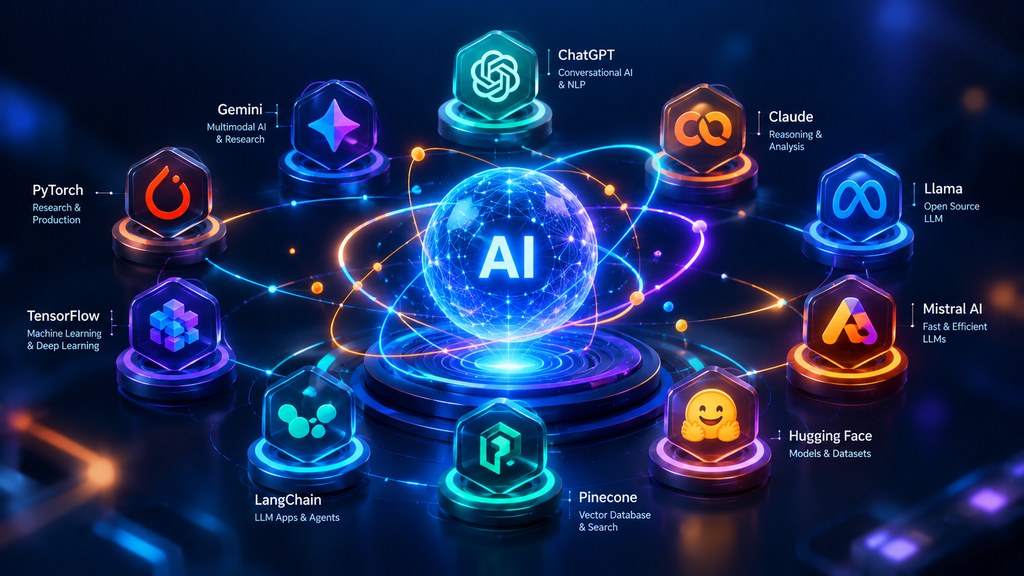
While working on content planning, keyword analysis, prompt design, and web development, I have explored different AI technologies. These include PyTorch, TensorFlow, LangChain, LlamaIndex, Hugging Face Transformers, Scikit-learn, and OpenCV. In this guide, I will cover how AI frameworks function, compare widely used options, and explain how to choose the right framework for your project.
What Are AI Frameworks?
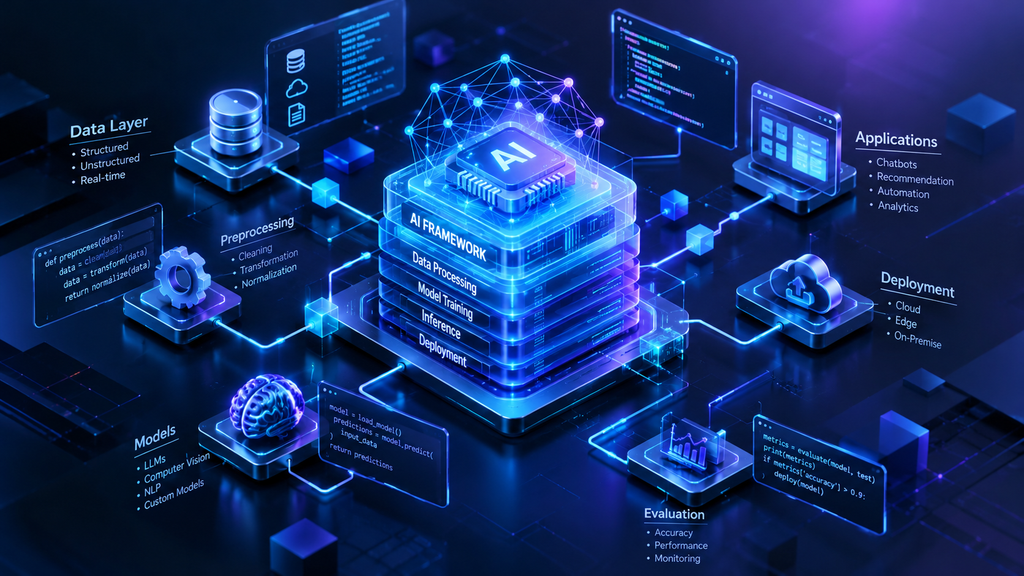
AI frameworks are software tools and libraries that support the development of artificial intelligence applications. Depending on their purpose, they can help developers train models, process information, make predictions, or connect existing models to applications.
For instance, a developer building an image detection application may use a deep learning framework to train a neural network. In contrast, someone developing a chatbot that answers questions from documents may use tools that link a language model with files and databases.
Each AI framework serves a different purpose. Some are designed for machine learning, others support deep learning, and some make it easier to develop applications using large language models.
How Do AI Frameworks Work?
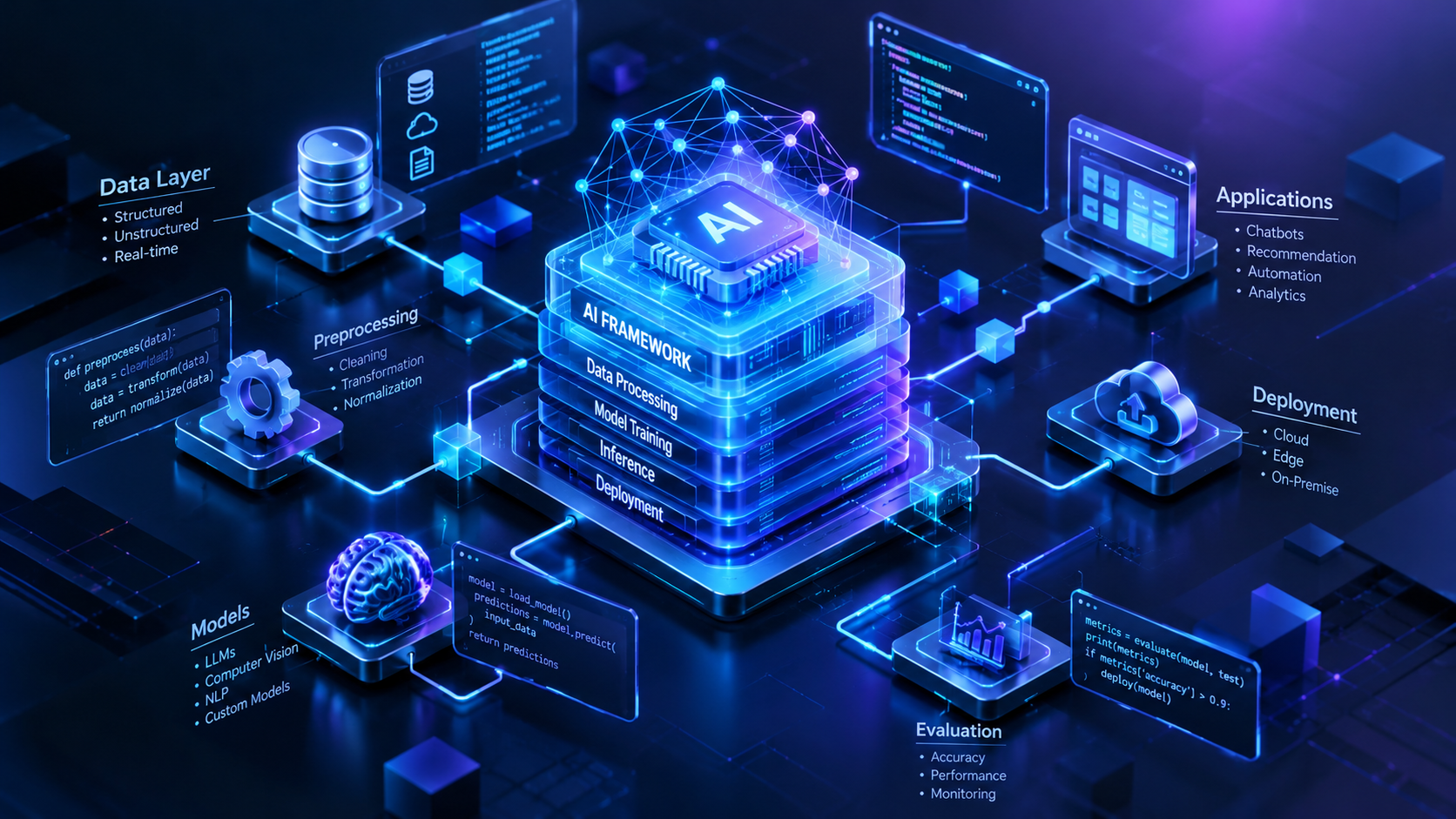
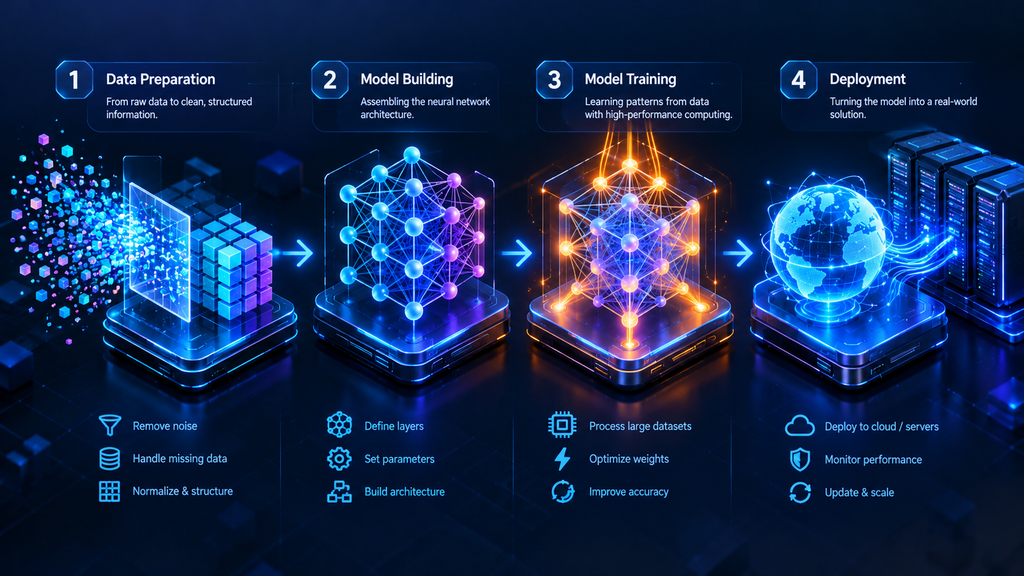
Every AI project usually starts by identifying a problem that needs to be solved. Developers then select appropriate data, models, and software tools.
The process often includes three main steps:
- Prepare the information: Prepare and structure text, images, numerical values, and other types of data.
- Build or connect the model: Train a new model, adjust a pre-trained model, or use an existing model through an API.
- Test and deploy: Evaluate the output, connect the solution to an application, and monitor its performance.
AI frameworks provide components for some or all of these stages. However, a project using a hosted AI model may not require training a model itself.
Why Are AI Frameworks Important?
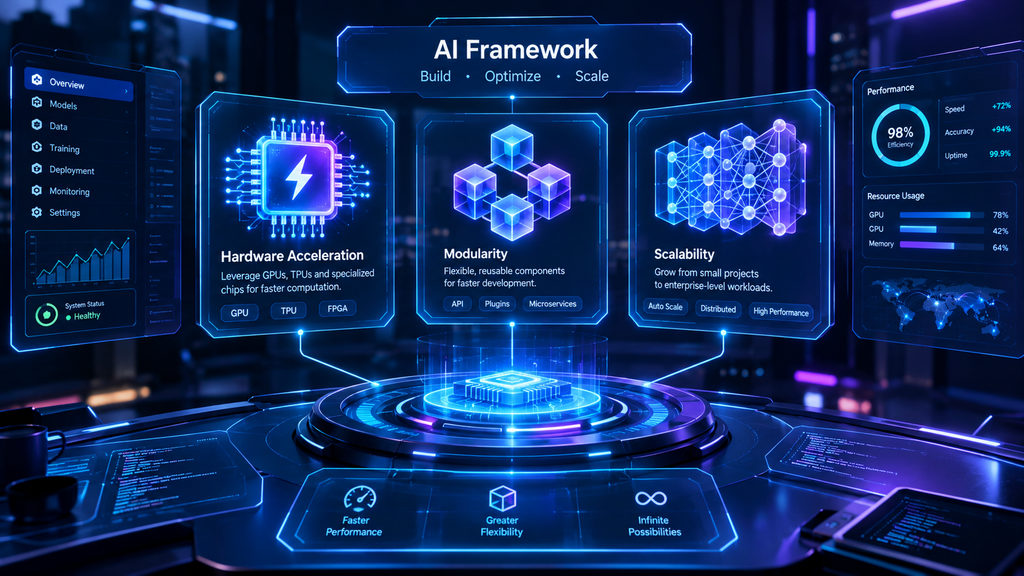
AI frameworks simplify repeated coding tasks, allowing developers to concentrate on addressing the main problem.
Faster development: Ready-made components make it easier to experiment without programming every operation manually.
Simpler testing: Developers can test different models and configurations to choose the option that best suits their requirements.
Integration: Many frameworks integrate with external libraries, APIs, databases, and other development tools.
Flexibility: Some provide greater flexibility for designing model structures, while others simplify the process of working with ready-made models.
Reusable workflows: Development teams can reuse existing components instead of building the same features repeatedly for every project.
However, AI frameworks alone cannot ensure reliable results, strong security, or reduced expenses. These factors depend on the quality of the model, data, infrastructure, and development methods.

Types of AI Frameworks
AI frameworks can be divided into three main groups based on their primary functions.
Deep Learning Frameworks
These frameworks are designed to build and train neural networks that identify patterns in large or complex datasets. They are used in image recognition, language processing, speech systems, and other advanced AI applications.
PyTorch and TensorFlow are major examples. Keras provides a simpler, user-friendly way to develop neural networks.
Traditional Machine Learning Libraries
These tools offer algorithms for tasks such as classification, regression, clustering, and forecasting. They are often useful when working with structured information, such as sales records or customer data. Scikit-learn and XGBoost are widely used tools for these types of tasks.
Generative AI and LLM Frameworks
These frameworks help developers create applications powered by large language models and other pre-trained AI models. They also make it easier to link models with documents, external tools, APIs, and business processes.
LangChain, LlamaIndex, and Hugging Face Transformers support different parts of this process.
8 Popular AI Frameworks and Tools
Different AI frameworks and supporting tools are designed to handle specific tasks and development needs. The best option depends on the type of application you want to create.
1. PyTorch
PyTorch is a deep learning tool that enables developers to create, train, and test neural networks. Its easy-to-use Python interface makes it a popular choice among researchers, software developers, and beginners exploring deep learning.
Based on my experience, I recommend PyTorch to beginners who want to understand model training instead of simply using an existing AI service. Its Python-based syntax makes testing ideas and fixing errors easier for developers.
PyTorch works well for customized deep learning projects, but simpler tasks may not require it if a suitable pre-trained model is already available.
2. TensorFlow
TensorFlow is an open-source framework designed to develop machine learning and deep learning applications. It offers tools for training models and creating AI solutions that can be deployed in real-world environments.
Developers can apply TensorFlow to various tasks, including image recognition, forecasting, and natural language processing.
It may suit projects that need its broader development ecosystem and supported deployment options.
Before selecting TensorFlow, evaluate its features and learning curve against other options, such as PyTorch.
3. Keras
Keras simplifies neural network development through a high-level interface. Developers can set up neural network layers, adjust training settings, and test model performance without coding every underlying process themselves.
It is also a useful entry point for beginners who want to understand deep learning by working on hands-on projects.
4. Hugging Face Transformers
Hugging Face Transformers provides access to pre-trained models for tasks such as text classification, summarization, translation, and question answering.
Pre-trained models have already learned patterns from training data. Developers can apply these models to compatible tasks or customize them to meet specific requirements.
I suggest exploring Hugging Face Transformers if you want to work with pre-trained models rather than develop an entire system from scratch.
Keep in mind that larger models may require considerable computing resources.
5. Scikit-learn
Scikit-learn is a machine learning library designed for everyday prediction and analysis tasks. It provides tools for data preparation, algorithm training, and performance testing.
For instance, a company might use it to group customer records into categories or identify customers who could stop using its services.
Scikit-learn is a suitable option for traditional machine learning projects that rely on structured data.
6. XGBoost
Scikit-learn is a machine learning library designed for everyday prediction and analysis tasks. It provides tools for data preparation, algorithm training, and performance testing.
For instance, a company might use it to group customer records into categories or identify customers who could stop using its services.
Scikit-learn is a suitable option for traditional machine learning projects that rely on structured data.
7. LangChain
LangChain helps developers connect language models with prompts, external tools, information sources, and application logic. It is useful for building chatbots, document assistants, and retrieval-augmented generation (RAG) applications.
I have used LangChain for RAG pipelines and LLM-powered applications. One project I built was a blog content recommendation and auto-tagging tool using LangChain and OpenAI’s API.
The tool processed long articles, generated relevant SEO tags, and recommended related posts based on semantic similarity rather than exact keyword matches. This helped make content strategy and internal linking faster.
The project shows how AI frameworks can connect a language model to a practical workflow instead of being used only for training models.
8. LlamaIndex
LlamaIndex helps applications access and retrieve information from external data sources. It can be useful when a language model needs to answer questions using documents or other information rather than relying only on its existing knowledge.
I have also used LlamaIndex for RAG pipelines and LLM-powered applications. When comparing LlamaIndex with LangChain, consider your retrieval needs, integrations, and the structure of your application.
A useful distinction: OpenAI’s API provides access to supported AI models, while tools such as LangChain can help organize model calls and connect them to other parts of an application. They can be used together, as in my content recommendation project.
Real-World Uses of AI Frameworks
AI frameworks support applications across different industries. Their role depends on the data, model, and problem involved.
Healthcare
AI systems can assist with medical image analysis, research, and administrative tasks. Healthcare applications require careful testing, privacy safeguards, and professional oversight.
Retail and Ecommerce
Businesses can use AI for product recommendations, demand prediction, customer analysis, and product categorization. Recommendation systems can identify relevant relationships between products and customer interests.
Finance
Machine learning models can help detect unusual transactions, assess risk, and identify potential fraud. Reliable results require suitable data and continuous evaluation.
Education
AI-powered applications can help generate learning materials, answer questions, and adapt educational content. Accuracy and student privacy remain important considerations.
Agriculture
AI can help analyze crop images, identify possible plant problems, and support predictions about crop conditions. Results depend on the quality of the data and local conditions.
Content and Business Workflows
AI frameworks can support document analysis, content classification, automated tagging, and internal information retrieval.
My blog recommendation project is one example. By combining LangChain with OpenAI’s API, I created a workflow that could identify related articles and suggest SEO tags. Similar approaches may help content teams organize large collections of posts more efficiently.

How to Choose the Right AI Framework
Choosing among AI frameworks becomes easier when you start with your project’s requirements.
Identify Your Goal
First, decide what you need to build. For neural network training, consider PyTorch or TensorFlow. For traditional machine learning, look at Scikit-learn or XGBoost. For applications using language models and external information, consider LangChain, LlamaIndex, or Hugging Face Transformers.
Consider Your Skills
Some AI frameworks require knowledge of model architecture and training. Others focus on connecting existing models to applications.
If you want to learn deep learning, PyTorch is a reasonable starting point. If your goal is to build an application with an existing model, an API and an appropriate integration library may be more practical.
Check Compatibility and Cost
Make sure your chosen tools work with your programming language, data sources, APIs, and deployment environment.
Also consider hosting, computing resources, API charges, and ongoing maintenance. Open-source software may be free to use under its license, but running a project can still involve costs.
Review Security and Privacy
Check how your application handles sensitive documents, credentials, and user information. If you use external AI services, review their data-handling terms and applicable privacy requirements.
Build a Small Prototype
Test your idea before developing a complete system. Use realistic examples to check whether the chosen tools provide useful results.
A small prototype can reveal limitations in data quality, model accuracy, integrations, and performance before you invest more resources.
Challenges of Using AI Frameworks
Although AI frameworks simplify development, they also introduce challenges.
- Learning requirements: Some libraries have complex features that take time to understand.
- Compatibility: Different versions of models and dependencies may cause integration problems.
- Computing resources: Training large models can require powerful hardware and substantial processing time.
- Data quality: Poor data can lead to unreliable predictions, even when the framework works correctly.
- Security: Applications must protect credentials and prevent inappropriate access to sensitive information.
- Maintenance: Deployed systems need testing, updates, and monitoring as requirements change.
Choosing the right framework is only one part of building a reliable AI solution. Developers must also test outputs, document limitations, and protect the data their applications use.
Best Practices for AI Development
To get more value from AI frameworks, follow a clear development process:
- Define the problem before selecting tools.
- Use relevant and reliable data.
- Test models against realistic examples.
- Compare alternatives instead of assuming one tool is best.
- Track important model and dependency versions.
- Protect private information and API credentials.
- Monitor deployed applications for errors and performance changes.
- Document what the system can and cannot do.
For applications using external documents, check whether the retrieval process finds relevant information. For predictive systems, evaluate performance using suitable test data.
These steps help developers understand the limits of their systems and make improvements when needed.
Frequently Asked Questions
1. What are AI frameworks used for?
AI frameworks help developers build, train, test, and deploy AI applications. Depending on the tool, they can support neural networks, predictions, image processing, chatbots, and document-based question-answering systems.
2. Which AI framework is best for beginners?
PyTorch is a good option for people who want to learn deep learning. Beginners building applications with existing language models may prefer tools such as LangChain and Hugging Face Transformers. The best choice depends on the project and the skills you want to develop.
3. Are AI frameworks free?
Many AI frameworks, including PyTorch, TensorFlow, and Scikit-learn, are available as open-source software. However, computing, hosting, commercial services, and API usage may involve additional costs. Always check the license and pricing of the tools you plan to use.
Final Thoughts
AI frameworks help turn AI capabilities into useful applications by providing tools for model development, prediction, and integration. PyTorch and TensorFlow support deep learning, Scikit-learn and XGBoost handle many traditional machine learning tasks, and LangChain and LlamaIndex help build applications around language models and external information.
My recommendation is to start with the problem you want to solve. Choose a suitable framework, test a small project, and expand only when the approach meets your needs. This keeps development focused and helps you select tools based on practical requirements rather than popularity.

Artificial intelligence is changing how developers build websites, apps, and software. Today, AI tools can generate code, explain errors, and help developers create applications from simple instructions. However, choosing the right AI programming languages is still important because each language offers different features, tools, and performance levels.
During my university e-commerce website project, I used ChatGPT with VS Code to create website pages, work with HTML, CSS, and JavaScript, and find coding errors. AI helped me understand problems and move forward, but the generated code sometimes needed corrections. This experience showed me that AI can support development, but programming knowledge is still necessary.
In this guide, we’ll explore the best AI programming languages, their practical uses, popular AI coding tools, and how to choose the right option for your project.
What Are AI Programming Languages?
AI programming languages are computer languages used to develop applications that can learn from data, recognize patterns, make predictions, or perform intelligent tasks. Developers use these languages to build machine learning models, chatbots, recommendation systems, and other AI-powered applications.
Python, Java, R, Julia, and C++ are common examples. Each language has different strengths. Python is popular for machine learning, R is useful for statistical analysis, and C++ supports applications that need high performance.
The right choice depends on what you want to build. You do not need to learn every language before starting with AI. Understanding one suitable language and its tools is often enough to begin.

How Programming Languages Support AI Development
AI systems require more than code. They also need data, computing resources, libraries, testing, and deployment tools. Programming languages connect these parts and help developers turn an idea into a working application.
For example, an online store might use Python to analyze sales data and recommend products to customers. The recommendation model could then connect to the website through an application interface.
Libraries make this process easier. TensorFlow and PyTorch support machine learning and deep learning, while scikit-learn provides tools for classification, regression, and clustering.
When choosing AI programming languages, consider the complete project, including how the model will be tested, deployed, updated, and maintained.
Best Programming Languages for AI Development
Different AI programming languages serve different needs. Python is a practical starting point for many projects, while other options are useful for statistical research, enterprise software, web development, or high-performance computing.
Python for Machine Learning and Deep Learning
Python is one of the most widely used AI programming languages because it has readable syntax, a large community, and many helpful libraries. Beginners can learn its basic structure without dealing with too many complex rules.
Python supports machine learning, deep learning, data analysis, automation, and natural language processing. TensorFlow and PyTorch help developers build neural networks, while scikit-learn supports common machine learning tasks.
For example, a retailer could use Python to study previous sales and predict which products customers may purchase next. Developers can test an idea quickly and improve it as they learn more about the data.
I recommend Python for beginners because its libraries and learning resources make it easier to start building practical AI projects.
R for Statistical Analysis and Data Visualization
R is designed mainly for statistics, data analysis, and visualization. It is useful for research projects that require careful examination of numbers, trends, and relationships.
Packages such as ggplot2 help create charts, while caret and randomForest support predictive modeling. Researchers can use these tools to study patterns and present findings clearly.
For example, a marketing team could analyze campaign results to compare customer responses and identify trends. R is especially valuable when statistical analysis is the main goal, although it is less common than Python for general AI application development.
Java for Enterprise AI Applications
Java is a mature programming language used in enterprise software, web applications, and large-scale systems. Its cross-platform support and strong development tools make it useful for organizations that need reliable applications.
Java can support recommendation systems, data processing, and AI features that connect with existing business software. Libraries such as Deeplearning4j provide tools for deep learning, while Apache Spark supports large-scale data processing.
For example, a retailer with an existing Java-based inventory system may choose Java-compatible tools to add intelligent stock predictions without rebuilding the entire application.
Julia for High-Performance AI Computing
Julia is designed for numerical analysis, scientific computing, and demanding calculations. It combines readable syntax with performance-focused features, making it useful for simulations and complex mathematical models.
Julia supports scientific research, machine learning, and quantitative finance. Its parallel computing capabilities can help with tasks that involve many calculations.
However, Julia has a smaller library ecosystem than Python. It is worth considering when performance and numerical computing matter more than having the widest selection of ready-made AI tools.

C++ for Performance-Critical AI Systems
C++ is known for speed and control over computer resources. It is useful for robotics, computer vision, game development, and AI systems that must respond quickly.
For example, a robot may need to process sensor data and react to its surroundings with very little delay. C++ can help developers build efficient components for these tasks.
C++ is more challenging for beginners because it requires a stronger understanding of memory and program structure. Python is usually easier to learn first unless a project specifically requires C++.
JavaScript for Web-Based AI Applications
JavaScript makes websites interactive and can connect AI features to web applications. Developers use it to build interfaces for chatbots, product recommendations, and intelligent search features.
For example, an online store could offer a chatbot that answers product questions. JavaScript can manage the chat interface while a server processes requests using an AI model.
JavaScript is useful for bringing AI features to users through websites, even when the underlying model is developed in Python.
Lisp and Prolog for Symbolic AI and Logic-Based Systems
Lisp and Prolog are associated with symbolic AI, where systems work with facts, rules, symbols, and logical relationships.
Lisp supports symbolic computation and flexible program structures. Prolog allows developers to define facts and rules that a system uses to search for possible answers.
For example, a rule-based expert system could use defined conditions to help identify possible causes of a technical problem. These languages are more specialized than Python but remain useful for understanding logic-based AI.
Haskell for Reliable and Functional Programming
Haskell is a functional programming language that focuses on clear expressions, strong types, and predictable behavior. It is used in areas such as compiler development, scientific computing, and formal verification.
Its type system can help detect certain errors before a program runs. Although Haskell is not a common first choice for general AI development, it can be useful when reliability and clear program behavior are important.
Swift, Go, and Rust for Specialized AI Applications
Swift, Go, and Rust serve different purposes in AI development.
Swift is useful for building AI-powered iPhone and iPad applications within Apple’s ecosystem. Go supports concurrent processing and can help manage data pipelines and distributed services. Rust focuses on performance and memory safety, making it useful for systems that need efficient resource management.
These AI programming languages show that AI development includes more than model training. Developers also need to build applications, connect services, and deploy systems reliably.
How AI Programming Languages Are Used in Natural Language Processing
Natural language processing (NLP) allows computers to analyze, understand, and generate human language. It supports chatbots, text summaries, document search, translation, and sentiment analysis.
Python is widely used for NLP because it has libraries designed for text processing and language models. NLTK provides tools for tasks such as tokenization, while spaCy supports efficient text analysis and named entity recognition.
The Hugging Face Transformers library helps developers work with models such as GPT and BERT. These models can support tasks like answering questions, summarizing documents, and generating text.
For example, an online store could analyze customer reviews to identify common complaints or use a chatbot to answer product questions. Python is a practical choice for building these features, while JavaScript can connect them to a website.

What Is AI Code Generation?
AI code generation uses artificial intelligence, especially large language models, to create computer code from natural language instructions or existing code. Developers can describe a task and ask an AI tool to produce a starting version.
For example, you could ask ChatGPT to create an HTML form, explain a JavaScript function, or help find an error in a program. AI tools can also translate code, improve readability, generate documentation, and suggest fixes.
During my e-commerce project, ChatGPT helped me work on website pages and understand coding errors. However, I still needed to review and correct the generated code. Treat AI-generated code as a draft, not a guaranteed final solution.
How AI Code Generation Works
AI coding models learn patterns from large collections of code and text. When a developer enters a prompt, the model uses the instructions and available context to generate a code suggestion.
Clear prompts usually produce more useful results. Instead of asking an AI tool to build an entire website, describe one feature, the expected behavior, and the language you want to use.
Work in small steps. Generate a feature, inspect the code, run it, and fix any problems before moving forward. This approach makes errors easier to identify and reduces the risk of damaging other parts of the project.

Benefits of AI Code Generation
AI coding tools can support developers by reducing routine work, explaining unfamiliar code, and helping them test ideas.
Faster Software Development
AI can generate common code structures, forms, API examples, and basic functions. Developers can review these suggestions instead of starting every task from an empty file.
For example, you could ask for a product card layout and then adjust its design to match your website. The actual time saved depends on how complex the task is and how much correction the code needs.
Improved Developer Productivity
AI assistants can explain errors, suggest fixes, and help developers understand unfamiliar projects. This can reduce time spent searching for solutions.
In my experience with the e-commerce project, ChatGPT helped when I needed to understand coding problems. Still, checking the suggestions was essential. AI works best when it supports your decisions rather than making them for you.
More Accessible Coding and Prototyping
AI code generation can help beginners create small prototypes while learning programming concepts. You can ask for an example and then request an explanation of each part.
For instance, a beginner could generate a contact form and learn how HTML creates the fields, CSS styles them, and JavaScript checks the input.
However, building a reliable application requires more than generating a first draft. You still need to understand the code, test its behavior, and maintain it.

Challenges of AI Code Generation
AI tools can produce useful code, but their output may contain mistakes, security weaknesses, or features that do not meet project requirements.
Code Quality and Accuracy
AI-generated code may contain bugs, repeated instructions, incorrect logic, or outdated methods. Developers should run the code, test different inputs, and check whether the output matches the expected result.
Unit tests can check individual functions, while integration tests help confirm that different parts of an application work together.
Security Risks in AI-Generated Code
Generated code can introduce unsafe input handling, weak access controls, or poor data protection. These issues are especially important for applications that handle customer information or payments.
Review security-related code carefully, follow secure coding practices, and never share passwords or private keys in prompts. AI assistance does not replace security testing.
Maintaining Programming Skills and Human Oversight
Depending too much on AI may limit opportunities to practise coding and problem-solving. Beginners can also struggle to fix errors if they do not understand the generated code.
Ask AI to explain its solution, make small changes yourself, and test the results. Developers remain responsible for the quality, safety, and reliability of the software they deliver.
Best AI Code Generation Tools for Developers
Different tools support different workflows. Some provide suggestions inside a code editor, while others can help with larger development tasks.
Claude Code
Claude Code helps developers understand projects and make changes across multiple files. It can support terminal-based workflows and work with supported code editors.
OpenAI Codex
Codex helps developers generate code, explain complex logic, investigate potential bugs, and suggest fixes. Its usefulness depends on the task, available project context, and the developer’s review.
Cursor
Cursor provides AI-assisted coding, codebase search, feature planning, and debugging. It can help developers understand how different files relate to one another.
GitHub Copilot
GitHub Copilot offers inline code completion and chat-based assistance in supported development environments. It can suggest code as you type and help explain programming questions.
Google Antigravity
Google Antigravity supports AI-assisted development tasks such as code generation, refactoring, and unit-test creation. Developers should inspect changes and test the results.
IBM Bob
IBM Bob helps with code generation, documentation, code explanations, and software modernization. It can support teams working with existing applications and development workflows.
Tabnine
Tabnine provides AI code completion and coding assistance, with an emphasis on privacy and enterprise deployment options. Teams should review its current privacy policies before using it with confidential code.
ChatGPT and Google Gemini for Code Generation
ChatGPT and Gemini can generate code, explain programming concepts, and help investigate errors through text prompts. They are useful for beginners and developers who want to explore solutions.
I used ChatGPT alongside VS Code during my website project. I could request code, test it in the editor, and ask for help when errors appeared. This step-by-step process was more useful than accepting a large block of code without checking it.
AI Code Generation vs. Low-Code and No-Code Development
Low-code and no-code platforms use visual tools, templates, and ready-made components to help users create applications with little manual coding.
AI code generation works differently. It uses natural language instructions to produce code that developers can inspect and modify.
For example, a business user might build a basic form using a no-code platform. A developer might use AI to generate a custom form with specific validation rules and then adjust the code to fit the application.
The best approach depends on your needs. Visual platforms can suit simple workflows, while AI code generation offers more flexibility for custom software. Both require suitable checks when reliability and security matter.
How to Choose the Right AI Programming Language for an AI Project
The best AI programming languages depend on your goals, skills, and technical requirements. Consider these four factors before choosing one.
Performance and Speed Requirements
Python is suitable for many machine learning tasks, while Julia supports numerical computing. C++ and Rust can be useful when an application requires fast execution and close control over resources.
Test performance with realistic workloads rather than assuming a language will always be faster for your specific project.
Ease of Use and Team Expertise
Python is a practical choice for beginners because its syntax is readable. JavaScript is useful for web development, while Java may fit teams already working with enterprise systems.
I recommend learning one language well before trying to master several. Once you understand basic programming concepts, learning another language becomes easier.
Libraries, Frameworks, and Community Support
Check whether the language has suitable libraries, clear documentation, and active support for your task. Python offers tools such as TensorFlow, PyTorch, and scikit-learn, while R has strong statistical and visualization packages.
Good library support can reduce development effort and help you solve problems more easily.
Scalability, Deployment, and Integration
Consider where your application will run and how it will connect with existing software. Java can support enterprise systems, JavaScript can connect AI features to websites, and Swift can support apps for Apple devices.
Plan for testing, updates, security, and maintenance from the beginning. A successful AI application must continue working after its first release.
The Future of AI Programming Languages and Code Generation
AI coding tools are moving beyond basic suggestions toward workflows that can edit files, write tests, and help investigate errors. These changes may reduce routine work, but developers still need to understand software design, testing, data handling, and security.
Different languages will continue to serve different purposes. Python remains a strong option for many AI tasks, while Java, C++, Rust, JavaScript, and other languages support specific development and deployment needs.
For beginners, the best path is to learn programming fundamentals, build a small project, and use AI as a learning partner. Test each important change and understand what the code does before relying on it.
Frequently Asked Questions For AI Programming Languages
1. Which programming language is best for AI beginners?
Python is a strong starting point because it has readable syntax, learning resources, and libraries for machine learning and data analysis. You can learn other AI programming languages later when your projects require them.
2. Can AI generate code without programming knowledge?
Yes, AI tools can create code from plain-language instructions. However, you still need to test the results, identify errors, and understand whether the code meets your needs. Basic programming knowledge makes AI tools much more useful.
3. Will AI code generation replace programmers?
AI code generation can automate routine tasks, but developers are still needed to plan applications, review code, test features, and protect user data. AI is best used as an assistant rather than a replacement for human judgment.
Conclusion
The right AI programming languages depend on the project. Python is a useful starting point for machine learning, R supports statistical analysis, Java suits enterprise applications, and Julia helps with demanding numerical work. Other languages offer advantages for web development, robotics, and specialized systems.
AI code generation can make development easier, as I experienced while building my e-commerce website with ChatGPT and VS Code. However, generated code still needs testing and correction. Start with one suitable language, practise regularly, and use AI tools to support your learning while staying responsible for the final result.
-

 AI in Digital Marketing1 month ago
AI in Digital Marketing: Practical Uses, Benefits, and Strategies
-

 AI Applications4 weeks ago
AI Content Optimization: What It Is and Why It Matters
-

 AI Technologies4 weeks ago
AI in App Development: How to Build the Best Apps From Idea to Production
-

 AI Technologies1 month ago
AI in Web Development: A Practical Guide to Coding, Powerful Tools, and Real-World Experience
-
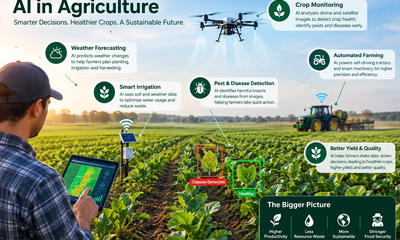
 AI in Agriculture1 month ago
AI in Agriculture: Uses, Benefits, Challenges, and Future Trends
-

 AI Applications3 weeks ago
AI in Gaming: Uses, Benefits, Examples, and Future Trends
-

 AI Applications4 weeks ago
AI in Construction: Uses, Benefits, Tools, Challenges, and Future Trends
-

 AI Applications3 weeks ago
AI Personalization: Smarter Marketing That Converts